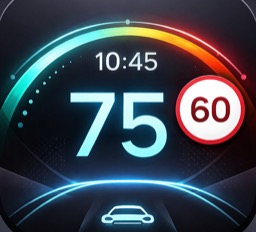
 Car HUD Display
Large GPS speed display
A prominent speedometer shows real-time GPS speed in MPH or km/h.
Features, intended use and limitations for Car HUD Display.
Car HUD Display projects essential driving information in a clear landscape interface designed for windshield reflection or direct in-car viewing.
The app combines real-time GPS speed with configurable widgets including clock, temperature, wind, compass, bearing, altitude, trip distance, average speed, max speed, trip time and battery level.
Car HUD Display is designed for drivers who want essential trip and speed information in a simple, high-contrast interface.
A prominent speedometer shows real-time GPS speed in MPH or km/h.
Choose up to four widgets from speed, clock, temperature, compass, trip and device data.
Mirror the display for windshield reflection and use full brightness when needed.
The app can adjust brightness using ambient camera readings for better visibility.
Car HUD Display is useful in common driving situations where fast, readable trip data matters.
Car HUD Display keeps important driving data visible in one focused interface, reducing the need to switch between multiple apps or screens.
It is designed as a utility for glanceable information. Drivers should always follow local laws, mount devices safely and keep attention on the road.
Car HUD Display requires location access for speed and GPS information. Weather data depends on network availability.
Use the app only when it is safe and legal to do so. Secure your device properly and do not interact with the app while driving.